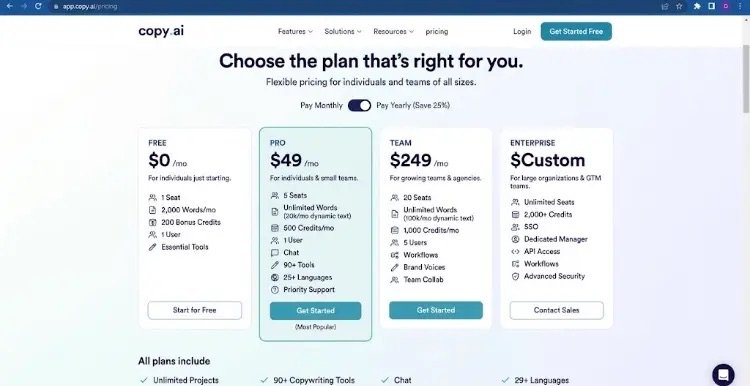
Copy.ai Free vs. Pro Plan: What’s Behind the Complaints and How to Fix Them
Copy.ai's transition to a credit-based model has raised questions about its pricing and plans. Here is an in-depth breakdown of the main Free vs. Pro issues and actionable ways to optimize your workflow.

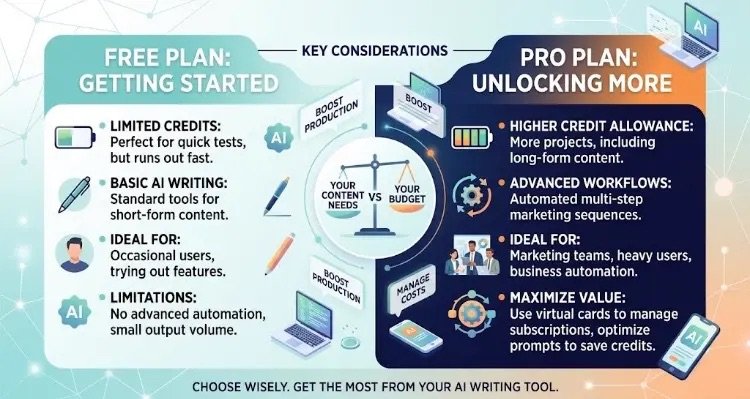
Copy.ai Free Plan vs. Pro Plan: A side-by-side comparison of features, credit limits, and ideal use cases.
If you’ve been keeping an eye on AI content tools lately, you’ve likely noticed a growing conversation—and plenty of frustration—around Copy.ai’s current pricing and feature setup. Once celebrated as a simple, high-value tool for marketers and writers, Copy.ai has made significant shifts in its product focus and pricing tiers.
This has left a lot of users asking: Is the Pro plan still worth it, or is the Free plan too limited to even test properly?
In this article, we’ll break down what users are actually complaining about, analyze the differences between the Free and Pro options, and share practical ways to solve or work around these issues.
What’s Causing the Backlash? (The Core Issues)
A look through user reviews, forum threads, and creator communities highlights a few recurring pain points:
1. The Shift to Credits and Rapid Token Burn
Copy.ai moved away from straightforward word-count setups toward a credit- and token-based model.
- On the Free plan: Your allowance runs out extremely fast—sometimes after just a few prompts or tests—making it hard to figure out if the software actually meets your needs.
- On the Pro plan: Advanced feature usage, like automated multi-step Workflows, consumes credits quickly. To make matters worse, unused credits generally don’t roll over to the next billing cycle, which feels penalizing for light-use months.
2. Billing and Cancellation Headaches
Billing transparency is another common complaint on review boards like Trustpilot. Several users report getting charged after thinking they had downgraded or canceled, or finding customer support slow to resolve refund requests during plan transitions.
3. Price-to-Value Mismatch for Casual Writers
At roughly $49 per month (depending on billing cycles), the entry Pro tier can feel steep if you only need a basic writing assistant for blog intros or social captions. When compared directly to standard $20/month AI subscriptions like ChatGPT Plus or Claude Pro, Copy.ai can feel overpriced for straightforward text generation.
4. Enterprise Workflow Shift
Copy.ai has increasingly pivoted toward B2B sales enablement and automated go-to-market (GTM) workflows. While great for sales teams, individual bloggers and small business owners often find themselves paying for complex features they never touch.
How to Work Around These Issues: Smart Solutions
If you like Copy.ai’s feature set but want to avoid burning money or dealing with billing headaches, here are a few actionable strategies:
1. Optimize Prompts Before Running Workflows
Because multi-step workflows drain credits fast, refine your prompts in a simple, low-cost chat interface first. Once you know the exact structure and instructions you want, feed them into Copy.ai’s workflows to prevent wasted runs.
2. Use Virtual Cards for Subscription Control
To protect yourself from unexpected renewal charges:
- Sign up or upgrade using a virtual credit card (like privacy.com or your bank’s virtual card feature) set with a strict spending limit or a one-time cap.
- Double-check your account dashboard immediately after canceling to ensure your status clearly says “Canceled,” and keep the confirmation email on file.
3. Choose the Right Tool for Your Specific Goal
- If you just need blog posts, copy editing, or social captions: You might be better off sticking with raw LLM subscriptions (like Claude or ChatGPT) paired with simple browser extensions.
- If you need automated prospect research and multi-step marketing sequences: Copy.ai Pro excels at this. Make sure you’re actually utilizing the B2B features to get your money’s worth.
4. Keep a “Human in the Loop”
No matter which plan you use, AI outputs still hallucinate or churn out generic phrases. Always review and edit drafts to ensure accuracy, maintain your brand voice, and avoid search engine quality penalties for low-effort, unedited content.
The Bottom Line
Copy.ai remains a powerful engine for teams that need heavy marketing automation, but its current credit structure and pricing make it less ideal for casual users. By understanding where your credits go, setting up billing safeguards, and picking the right tool for your specific workflow, you can get the best output without overspending.