What is SaaS? A Comprehensive and Beginner-Friendly Guide
"Curious about SaaS? Discover what Software as a Service is, how it compares to traditional software, real-world examples like Netflix and Google Workspace, and why businesses and users love the subscription model."

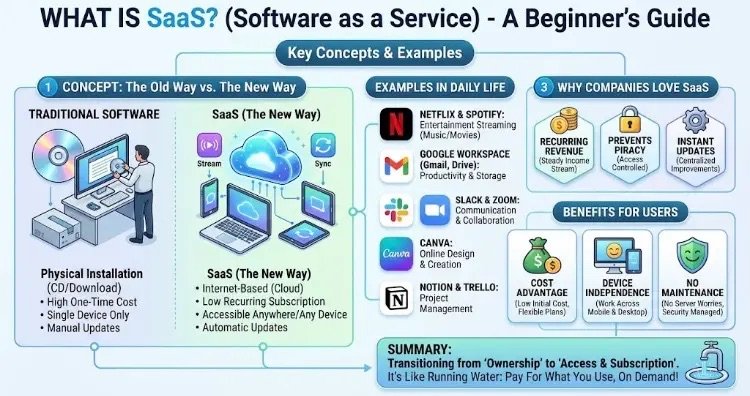
“An educational graphic providing a detailed beginner’s guide to Software as a Service (SaaS), illustrating key concepts, a comparison with traditional software, daily examples, business benefits, user advantages, and a core summary. This comprehensive visual guide is designed for clarity and engagement, making complex SaaS concepts accessible.”
SaaS (Software as Service) is one of the most popular business and technology models in today’s digital world, completely transforming how we buy and install traditional software.
Let’s break it down from the very basics, without any technical jargon, using everyday examples.
1. What is SaaS? (In the Simplest Terms)
Back in the day, if you wanted to install a program on your computer (like Microsoft Office or Photoshop), you would go to a tech store to buy a CD or download a massive installation file from the internet. It took up space on your hard drive, you had to pay again when a new version came out, and you could only use it on that specific computer.
SaaS completely throws this logic out the window. Instead of installing software on your computer, SaaS allows you to use it via the internet (in the cloud) with a monthly or yearly subscription.
- Everyday Analogy: Buying a DVD and watching a movie at home is traditional software; being a Netflix subscriber and instantly streaming thousands of movies over the internet is the SaaS mindset. You don’t download the movie to your computer; it lives on servers, and you simply rent access to it.
2. Differences Between Traditional Software and SaaS
The fundamental differences between old-school programs and the modern cloud-based SaaS system are:
- Installation Process: Traditional software requires you to manually install it on your computer using a CD or a downloaded setup file. With SaaS, there is no installation at all; it opens instantly through your internet browser (Chrome, Safari, etc.).
- Update Management: With traditional software, when a new version or patch is released, you have to purchase it again or manually install it. SaaS updates automatically and for free in the background, ensuring you always use the latest version.
- Device and Location Access: Traditional software only works on the physical computer where you installed it. SaaS can be easily accessed from any device with an internet connection (phones, tablets, different computers).
- Payment and Cost Model: Traditional software involves a high, expensive one-time license fee. SaaS models use low-budget monthly or yearly subscriptions (pay-as-you-go).
3. SaaS Examples We Use Every Day
Whether you realize it or not, you use dozens of SaaS products every single day on your phone and at work:
- Netflix & Spotify: The SaaS models of the entertainment world. You don’t download music or movies; you consume them via cloud streaming.
- Google Workspace (Gmail, Google Drive, Docs): Allows you to edit documents and store files through your browser without installing heavy office programs on your computer.
- Slack & Zoom: Cloud-based communication tools used for messaging and video meetings at work.
- Canva: Allows you to create professional visuals in your web browser without downloading any design software.
- Notion & Trello: Enables you to manage projects and take notes online as a team.
4. Why is SaaS So Popular for Companies?
Why do entrepreneurs and software companies now build SaaS models instead of selling boxed software?
- Recurring Revenue: Instead of one-time sales, regular billing happens every month, making company budgets predictable and sustainable.
- Prevention of Piracy: Because the software runs in the cloud, users cannot copy the file; they can only access it by paying the subscription fee.
- Instant Intervention and Feedback: When users experience a bug or request a feature, the company updates the code on a single central server, and the change instantly reflects for users worldwide.
5. What Are the Benefits for Users?
- Cost Advantage: Instead of paying thousands of dollars in license fees, you can start with small monthly fees (e.g., $10–$20 a month).
- Device Independence: You can continue a task you left unfinished on your office computer later in the evening on your phone or tablet without any file-transfer hassle.
- No Maintenance Hassle: Annoying technical chores like server crashes, security vulnerabilities, and backups are entirely handled behind the scenes by the software provider.
In Summary
SaaS is the technology that closes the era of “ownership” and opens the era of “access and subscription.” Just like running water from a tap; you don’t bother storing water in a tank, you simply turn on the tap, use as much as you need, and pay for what you use. It is a modern service model that accelerates our digital tasks, lowers costs, and makes life easier.