
Copy.ai Team Plan & Seats Pricing Confusion: Why It Happens and How to Fix It
Confused by Copy.ai's team plan and per-seat pricing? Discover why per-user costs and workflow credits cause confusion, and find the right Copy.ai tier for your team.

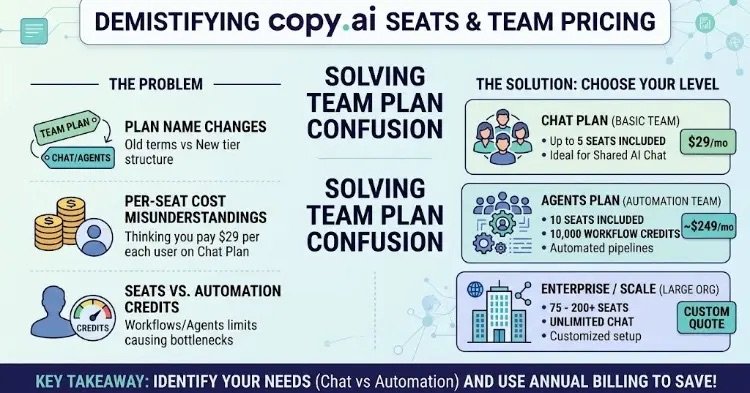
Copy.ai seats pricing and team plan guide: Solving user cost confusion across Chat, Agents, and Enterprise tiers.
Navigating pricing pages while choosing AI tools for your team can often feel like wandering through a maze. Recently, search queries like “Copy.ai seats pricing team plan” have spiked because of the exact same confusion.
If you are trying to set up a Copy.ai workspace for your team and feel stuck around user seats, package tiers, or automation credits, you are not alone. In this post, we break down the root cause of this pricing confusion and provide clear, actionable solutions to help you pick the right plan for your team.
What Is the Problem? (3 Root Causes Behind the Confusion)
Users usually run into friction around “Team Plan” and “Seats Pricing” for three main reasons:
1. Legacy “Team Plan” Terminology Has Changed
Older articles and reviews frequently mention a dedicated “Team Plan” for Copy.ai. However, Copy.ai updated its tier structure. Instead of a single package called “Team Plan,” the platform now categorizes plans primarily into Chat, Agents, and Enterprise / Scale. Users searching for a button labeled “Team Plan” in their dashboard often assume something is missing.
2. Per-Seat Cost Structure
Calculating total costs based on team members (seats) can be counterintuitive:
- Chat Plan ($24 – $29/month): The entry-level paid plan already includes up to 5 Seats. Teams often incorrectly assume they need to pay $29 per user, overestimating their initial budget.
- Advanced / Growth Plans (Agents, Enterprise): Scale up to 10 seats, 75–200 seats, or custom unlimited seats for enterprise operations.
3. Seats vs. Automation Credits Confusion
The primary bottleneck teams run into is usually not the physical seat limit, but workflow automation credits. While the Chat plan allows 5 members to chat with AI, it does not include credits for complex automated workflows (Agents/Workflows). When team members attempt to run automated processes, they trigger “Plan Limit Reached” notices, requiring an upgrade to higher tiers.
Current Copy.ai Plans & Seats Comparison
Use this quick overview to check seats, pricing, and optimal use cases across tiers: Plan NameMonthly PriceAnnual Price (Monthly Rate)Included SeatsIdeal Use Case Chat$29 / mo$24 / mo ($288/yr)5 SeatsSmall teams needing shared AI chat workspace Agents~$249 / moCustom / Tiered10 Seats (Includes 10k credits)Content marketing teams running automated workflows Enterprise / ScaleCustomCustom quote75 – 200+ SeatsLarge marketing and sales organizations
Solutions: How to Choose the Right Setup for Your Team
Follow these steps to resolve your pricing uncertainty and optimize your budget:
Step 1: Identify Your Core Needs (Chat vs. Automation)
- Basic Collaboration (Up to 5 Users): If your team only needs to brainstorm, draft, and edit content together in a shared interface, you don’t need a custom enterprise deal. The Chat Plan ($29/mo or $24/mo billed annually) covers up to 5 seats out of the box.
- Automated Pipelines: If your team requires automated blog generation, bulk data processing, or custom workflows, you must move up to the Agents / Enterprise level.
Step 2: Opt for Annual Billing
If you know your team will use the tool long-term, switching to annual billing reduces total seat costs by nearly 20%.
Step 3: Manage Workspace Invitations Correctly
Log in as an Admin and navigate to Settings > Workspaces / Team Members to invite your team. As long as you stay within the 5-seat limit on the Chat tier, you will not incur additional per-user charges.
Step 4: Request Custom Enterprise Quotes for Larger Teams
If your organization requires more than 10 seats, specialized data compliance, or custom workflow volume, contact Copy.ai sales directly for a tailored seat allocation.