

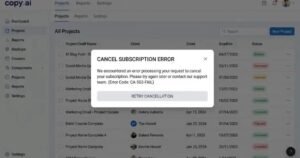
AI writing tools have transformed content creation, but ending a subscription when you no longer need the service can sometimes feel like solving a puzzle. Recently, a growing number of Copy.ai users have shared similar frustrations across platforms like Reddit, Trustpilot, and online forums regarding one main issue: canceling their subscription.
Many users report difficulty finding the cancellation option, unexpected recurring charges after trying to cancel, or challenges reaching customer support.
Why do these cancellation issues happen, how do they impact users, and what is the exact step-by-step method to cancel your Copy.ai account smoothly? Here is a complete breakdown.
Why Do Users Experience Issues Canceling Copy.ai?
Analyzing user feedback and platform workflows reveals several key factors behind these recurring cancellation challenges:
1. Hidden Navigation and Complex Layouts (Dark Patterns)
Like many software-as-a-service (SaaS) platforms, onboarding is seamless, but opting out can be tricky. The “Cancel Subscription” option is often nested deep within workspace or billing settings, styled in low-contrast text, or placed under alternative labels like “Downgrade Plan.”
2. Missing Renewal Reminders
When a free trial ends or an annual/monthly billing cycle approaches, automated email reminders might get lost in spam or go unreceived. Users often realize their subscription renewed only after seeing a charge on their credit card statement.
3. Multiple Accounts via Social Logins
Users who sign in using Single Sign-On (SSO) or Google authentication sometimes unintentionally create duplicate accounts under different email addresses. When logging in to cancel, they may check an inactive account with no active subscription while their primary card continues to be charged elsewhere.
How Does This Impact Users?
- Unwanted Financial Expenses: Paying recurring subscription fees for an unused service strains monthly personal or business budgets.
- Refund Challenges: Securing a refund after an unwanted renewal can involve back-and-forth communication with support teams, with no guarantee of reimbursement depending on terms of service.
- Frustration and Friction: Spending time searching through settings or tracking down support channels leads to a poor user experience.
Step-by-Step Guide: How to Cancel Your Copy.ai Subscription
If you want to end your paid subscription or avoid automatic renewals, follow these precise steps:
Step 1: Log in with the Correct Account
Double-check the email associated with your payment receipt. Navigate to Copy.ai and make sure you log in to the exact account tied to the active plan.
Step 2: Access Workspace Settings
Click on your profile icon or workspace name in the bottom-left corner of the dashboard. Select Workspace Settings or Account Settings.
Step 3: Open the Billing Tab
In the left sidebar, click on Billing. Here, you will see your active plan details and upcoming renewal date.
Step 4: Manage and Cancel Subscription
Click on Manage Subscription or Cancel Subscription. (Note: You may be redirected to a secure payment gateway page, such as Stripe. Once redirected, confirm your selection by clicking Cancel Plan.)
Step 5: Verify Confirmation Email
Once canceled, check your inbox for an automated cancellation confirmation email. If you do not receive this email, log back in to verify that your plan status has changed to reflect the pending cancellation.
What to Do If You Still Cannot Cancel (Plan B)
If you encounter technical errors or cannot find the cancel button inside your dashboard:
- Email Support Directly: Send a direct request from your account’s email address to
support@copy.ai. Clearly state that you are requesting an immediate cancellation of your subscription and retain a copy of this email for your records. - Use Virtual Card Limits or Freeze Card: If processing takes longer than expected, adjust spending limits on your virtual card or temporarily pause online transactions through your banking app.
- File a Chargeback Dispute: If you were charged after submitting a valid cancellation request or attempting to cancel without support resolution, contact your card issuer or bank to request a dispute for unauthorized recurring charges.
Key Takeaway
While Copy.ai is a powerful tool for generating marketing content, staying proactive with account management is key. Whenever signing up for new AI SaaS trials, using virtual credit cards with spending limits and setting calendar reminders a few days prior to renewal dates can save you time and money.