AI Workflows: What They Are, How to Build Them, and How They Are Transforming Business
Discover how AI Workflows transform single prompts into automated, end-to-end pipelines. Learn step-by-step how to build efficient AI workflows while maintaining Google SEO standards.

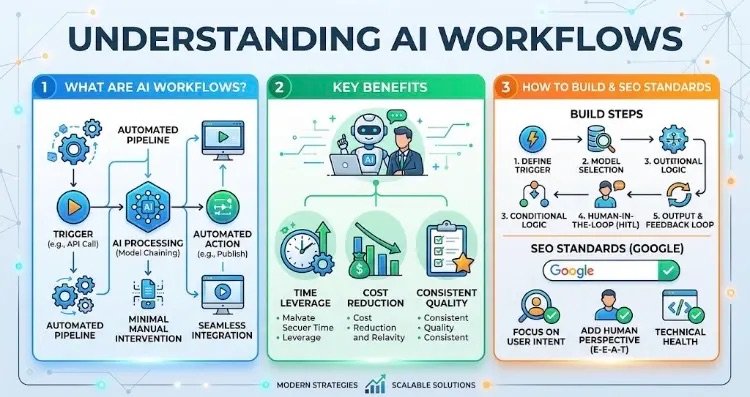
“Infographic explaining AI Workflows, automated pipeline building steps, key benefits, and Google SEO standards.”
When people think of Artificial Intelligence today, they often picture simple chatbots answering prompt requests or generating random pieces of text. However, the dynamics of the business world and digital content production are shifting rapidly. Success no longer lies in asking a single AI tool isolated questions; it depends on creating AI Workflows—seamless, automated pipelines that chain together multiple tools, models, and applications.
So, what exactly are AI Workflows? How do you design them, and what strategic value do they deliver to businesses and creators? Here is a comprehensive breakdown covering every crucial detail you need to know.
1. What Is an AI Workflow?
An AI workflow is an automated pipeline where data is retrieved from a source, processed, analyzed, and optimized by AI models, and converted into a final action (such as publishing, reporting, or sending an email) without requiring manual human intervention at every stage.
In traditional AI usage, every step—keyword research, drafting, image generation, SEO formatting, and uploading to a CMS—must be triggered manually. In an AI Workflow, a single trigger (such as a new entry in a Google Sheet or an API call from Google Trends) fires off the entire sequence, executing every step automatically in the background.
2. Traditional AI Usage vs. AI Workflows
FeatureTraditional AI Usage (Prompting)AI Workflows (Automated Pipelines) Process ManagementManual, fragmented, and time-consuming.Fully automated, continuous, and hands-off. ScalabilityLimited to a few outputs per day.Scales large-volume operations instantly. IntegrationRelies on manual copy-pasting across apps.Apps (WordPress, Google Sheets, n8n, APIs) connect natively. Error RateProne to human fatigue and oversight.Standardized using rule-based conditional logic.
3. What Are AI Workflows Used For? (Use Cases)
Workflow-oriented AI systems are revolutionizing digital marketing, e-commerce, content management, and customer relations. Key applications include:
- Automated Content & SEO Pipelines: From keyword clustering and SEO-optimized drafting to automatic publication or saving as drafts in WordPress.
- Customer Support & Routing: Analyzing incoming support tickets with Natural Language Processing (NLP) for sentiment, prioritizing them, and automatically routing them to the right team.
- Data Analysis & Executive Reporting: Aggregating raw analytics from disparate sources (Google Search Console, social metrics, etc.) and transforming them into strategic executive summaries.
- E-Commerce Product Management: Ingesting raw product specs or images to instantly generate platform-compliant descriptions, metadata, tags, and promotional social copy.
4. Step-by-Step: How to Build an Effective AI Workflow
Building a sustainable AI workflow requires structured engineering logic rather than randomly connecting tools together.
Step 1: Define the Trigger
Identify the exact event or schedule that starts the process.
- Example: “Whenever a new row is added to a Google Sheet” or “Every Monday at 9:00 AM.”
Step 2: Set Up Data Processing & Model Selection
Determine which AI model (e.g., OpenAI, Claude, or open-source alternatives) will process the data at each stage. Break complex tasks into distinct sub-tasks (e.g., analyze search intent first, then generate the draft).
Step 3: Implement Conditional Logic
Outputs vary in quality. Add guardrails such as: “If the quality score is below 80, route to a re-writing prompt; if 80 or above, pass to the next node.”
Step 4: Integrate a Human-in-the-Loop (HITL) Layer
Fully autonomous systems can make mistakes. For public-facing content or brand messaging, having a human review or approve drafts before final publication remains a best practice.
Step 5: Output Execution & Feedback Loops
Send the finalized output directly to its destination—your CMS, newsletter platform, or social scheduler. Continuously feed performance metrics (clicks, engagement) back into the workflow to refine future iterations.
5. Critical Technical Details Often Overlooked
To ensure your workflow is both cost-effective and reliable, keep these advanced considerations in mind:
- Token & Cost Optimization: Running large, expensive LLMs for simple tasks bloats operating costs. Practice model chaining: use lightweight, fast models for categorization or text cleanup, and reserve frontier models for deep reasoning and creative synthesis.
- Context & Schema Drift: Passing data across multiple APIs can lead to broken formatting or lost metadata. Enforce strict JSON schema validation between pipeline nodes to prevent pipeline failures.
- Balancing SEO with Authenticity: Unfiltered, fully automated pipelines risk producing generic, repetitive content. Inject dynamic prompt layers that incorporate E-E-A-T (Experience, Expertise, Authoritativeness, and Trustworthiness) signals and unique data points.
6. Primary Benefits for Businesses and Creators
- Time Leverage: Compresses weeks of research, execution, and scheduling into minutes.
- Operational Overhead Reduction: Minimizes reliance on manual labor for repetitive, administrative tasks.
- Consistent Quality & Output: Eliminates bottlenecks caused by human delay, maintaining brand voice, publishing velocity, and data accuracy.
7. Meeting Search Engine & SEO Requirements (Google Standards)
Search engines like Google do not penalize AI-generated content or automated workflows by default; they target low-quality, repetitive, spammy content that lacks user value. To maintain high search performance:
- Focus on Search Intent: Ensure the workflow addresses genuine user queries and provides clear, actionable answers.
- Avoid Commodity Content: Use AI to generate solid drafts or raw structures, then layer in human expert insights, original data, or unique perspectives.
- Protect Technical Health: Ensure automated posting pipelines respect site structure, clean markup, and page speed standards.
Key Takeaway
AI Workflows elevate artificial intelligence from a simple Q&A tool into a 24/7 operational engine. When designed correctly, they lower costs, maximize output quality, and give businesses a distinct competitive edge.